Showing posts with label Photoshoot. Show all posts

Friday, June 10, 2011

キレイな写真を撮るコツ Tips on Photographing Your Products


先週「品物の写真はお店の命」と言う話をしました。Etsyのお店のためにプロ級のカメラや用具をわざわざ購入する必要はありませんが、でもなるべくキレイな写真を撮れるよう少しは勉強したほうがいいとは思います。いくら素敵な品や面白い品を販売していても、写真が暗かったりブレがひどかったりすると多くのお客さんは詳細を見てもくれません。ということで今週は写真を撮る時のコツを少しご紹介したいと思います。
Last week, I mentioned the importance of having good pictures of your product. I don’t think it’s necessary for you to buy a professional grade camera just for your Etsy store, but I do think you should do a little homework about taking good photographs. Even if you have a great product, many people won’t bother to look at the listing if the pictures are dark or blurry. So, this week, I’ll share some tips on taking good photos of your products.

1.カメラの使用説明書をしっかり読む ~ Read your camera’s manual
まずは今もっているカメラにはどんな機能があるのかしっかり勉強しましょう。白くあるべきものが青く写ったり黄色く写ったりしてしまった時、ホワイトバランスの調整はできますか? 露出補正はどうでしょう? もっと明るい写真にしたい時などこれがあると便利です。小さな品を撮る時便利なクローズアップモードはありますか? 「こんなことできるなんて知らなかった」という発見もあるかもしれないのでせめてパラパラッとでも目を通してみてください。
First thing first, let’s find out which functions are available on your camera. If something that is supposed to be white appears blue or yellowish in your photo, can you adjust the white balance? How about adjusting the brightness? If there is a feature that allows you to do that, it’ll come in handy when you want your photo to be a little brighter or darker. Does your camera have a Close-Up mode if you plan on selling relatively small items? You should at least flip through the manual. You might discover something there that makes you say, “I didn’t know it could do that!”

2.カメラのフラッシュは使わない ~ Don’t use the built in flash
カメラをオートにセットして室内で写真を撮ると、たいていの場合は自動的にフラッシュがたかれます。くっきりとした写真が撮れることは撮れるのですが、品物が変に光ってしまったり 真正面からの光で立体感がなくなってしまうことがよくあります。大きな窓のそばなど なるべく明るい場所で撮影すればフラッシュをたく必要はなくなります。それでも暗すぎて写真がブレてしまう場合は三脚を使うことをお勧めします。
When you take a picture indoors with the camera set on Auto, the built in flash automatically turns on most of the time. The resulting picture is usually nice and crisp, but there are often glares on the product, or the item ends up looking flat due to the harsh light from the front. Try to take your photos in a brightly lit area, such as right next to the window, so that you won’t have to use the flash. If the picture turns out a little blurry because the area is still a little too dark, a tripod will help tremendously.

3.大きな白い紙か布を用意する ~ Get a large piece of white paper or cloth
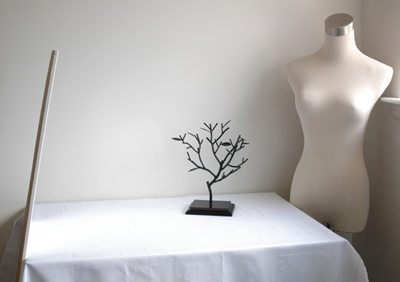
私は品物の写真は上のように窓際の机で撮影しているのですが、左側に大きな鏡が立てかけてあるの、お分かりですか? 肉眼ではそう違いはないのですが、写真で見ると鏡のあるところだけ随分明るくなっているのが一目で分かります。大きな鏡がなくても窓の反対側に大きな白い紙や布を設置するだけで同じ効果があります。これ一つあるだけで写真の印象が随分やわらかくなりますのでぜひ試してみてください。
I usually take my photos at a desk near a window, as shown in the photo above, but can you tell that I have a mirror propped up against the desk on the left hand side? It’s not very noticeable when you are looking at the set-up with your own eyes, but the area in front of the mirror is clearly brighter than the rest when a camera looks at it. If you don’t have a large mirror, setting up a large piece of white paper or cloth opposite your window will do the same trick. This simple trick will significantly soften the impression of your photographs, so try it!
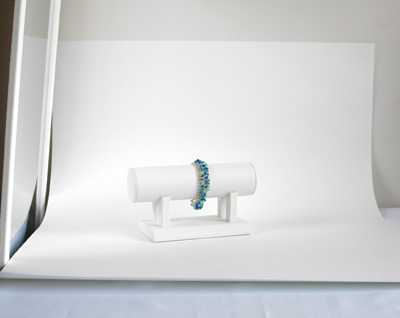

大きな紙や布は背景としてもすごく役立ちます。撮影している時には全然気付かなかったのにできた写真を見たら背景に変な物が写っていた、なんてよくある話です。白い机と白い壁の境目でさえ気になってしまうこともあるので大きな紙をうまく使って背景のごちゃごちゃを始めから隠してしまいましょう。写真のように紙の半分を品物の下に敷き、上のほうは壁に立てかけるようにするとキレイに撮れます。
A large paper or cloth will also come in handy as your backdrop. You’ve probably taken at least one picture that you thought was great, but had a distracting background when you looked at the actual photograph. Even the borderline between a white desk and a white wall can be distracting, so it’s much easier if you just cover up the background in the first place. You can get a simple and smooth background by placing half of the paper underneath your item and leaning the rest against the wall, as in the photo.

あとは品物にもっと近づく、真上・真正面からだけでなくいろいろな角度から撮ってみる、などすると目を引く写真が撮れるようになるはずです。
Other than that, if you get close to your item and shoot pictures from multiple angles (not just the front and the top); you’ll probably end up with nice, eye-catching photos.

Friday, June 3, 2011

品物の写真撮影 Photographing Your Products


ネットでお買い物した時のことを考えてください。本とかDVD等外見はどうでもいい品を買うなら別ですが、やはりたいていの場合は買う前に品物の写真をちゃんと見たと思います。ただ単にピンク色だと言われたってそれが淡いピンクなのか派手なピンクなのかは写真を見ないと分かりません。とくにEtsyでは手作りのものや一品物を販売することが多いので写真は絶対に必要です。実際「品物の写真はお店の命」と言ってもいいほどです。
Think back to the last time you purchased something online. Unless the outside appearance of the item was irrelevant to you, like if you were looking for books or DVDs, you most likely wanted to see pictures of the item before you purchased it. If the description only told you that the color was pink, you wouldn’t know if the item was soft pink or bright pink until you looked at the picture. Since you most likely will be selling handmade and one-of-a-kind items on Etsy, having good pictures is essential. In fact, it may not be too far fetched to say that your item pictures can make or break your store.

Etsyでは出品する際、一品5枚まで写真をアップロードできるようになっています。品物を手で触ることができないお客様のためにもなるべくたくさんの写真をいろいろな角度から撮りましょう。例えばハンドバッグを販売する場合にはこんな5枚を:
  1. 真正面から撮った写真
  2. バッグを開いて中のポケットなどが見えるように撮った写真
  3. 大きさが分かるようにモデルに持ってもらったり日常品をそばに置いて撮った写真
  4. 素材の質感が分かるようにぐんと近づいて撮った写真
  5. バッグの裏側や底の構造が分かるような写真

When you list an item on Etsy, you can upload up to 5 pictures per listing. Since your customers won’t be able to touch the item with their hands, make the photos as descriptive as possible. For example, here are the 5 pictures you might take if you are selling handbags:
  1. A straight on shot of the bag.
  2. A shot of the bag from the top to show the inside pockets, etc.
  3. A shot in which a model is holding the bag or it is next to an everyday object, in order to emphasize the item’s size.
  4. A close-up shot of the item to show off the texture of the material.
  5. A shot that shows the back or the bottom construction of the bag.


一枚目の写真はサムネイルとして色々なところで使われますので5枚の中からもっとも目を引くものを選びます。さて、ここが少し厄介なのですがEtsyでは作品のリストを見るときにGallery Viewで見るかList Viewで見るかをユーザーの好みで選択できるようになっていて、サムネイルもGallery Viewの場合は170x135ピクセルの長方形、List Viewの場合は75x75ピクセルの正方形とどちらを選んだかによって変わってしまいます。要するに長方形でも正方形でもきれいに見える写真を撮らなければいけないと言うことです。
The first picture of the listing will be used as a thumbnail in many areas of Etsy, so pick the most eye-catching one from the 5 photos. Now, this is where things get a little tricky, but on Etsy, a user can choose how to view a list of items, by “Gallery View” or “List View.” When you choose Gallery View, the thumbnail is a 170x135 pixel rectangle. But in List View, the thumbnail changes to a 75x75 square. In other words, you have to frame a picture so that it looks great both as a rectangle or a square.

たいていの方はこのため、始めから写真を正方形にトリミングしていらっしゃいます。そうすれば正方形のサムネイルにぴったりですし長方形の場合も上下がほんの少し切り取られるだけになります。横長の長方形の写真も使えますが170x135と同じ比率にトリミングしておかないと長方形のサムネイルでも両端を切り取られてしまいます。縦長の長方形は切り取られる面積が多くなってしまうのでお勧めできません。帽子を売っているのに肝心な帽子は切り取られていてモデルさんの顔しか見えない、なんていうサムネイルも時々見かけます。
For this reason, many people crop their photos as a perfect square from the beginning. This way, the square thumbnail looks exactly the way you intended it to look, and only a little bit of the top and the bottom will be cut off for the rectangular thumbnail. You can also use a rectangular picture if it’s horizontal, but unless you crop it to the same ratio as 170x135, some parts of your picture may be cut off even in the rectangular thumbnail. Vertical pictures are not recommended since large areas of your picture will be cut off in both types of thumbnails. I’ve seen listings for hats with only the model’s face in the thumbnail because the actual product was too close to the top of the picture and was cut off.

ちょうどいい形にトリミングできたら画像サイズを縮小して保存します。最低限でも横幅は570ピクセルなくてはいけませんが、たいていの方は800から1000ピクセルぐらいの大きさにしていらっしゃいます。そうすれば品の詳細ページの写真をクリックした時 写真が拡大され、お客様に作品の細かいところまで見せることができます。
Once you’ve cropped your picture to the right shape, reduce the image size and save it. The minimum width is 570 pixels, but many people resize the photos so that they are about 800 to 1000 pixels wide. This is because when you click on the pictures in the item description page, a new window opens up with a larger picture, allowing your customers to see your products in greater detail.

今週は長くなりすぎるので書きませんが、キレイな写真を撮るコツを来週少しご紹介したいと思っています。
I don't have enough space to write about it this week, but next week, I want to share with you some tricks for taking nice pictures of your product.

Monday, April 5, 2010

52 Week Challenge: Week 13

Old Bike WheelWhee! Yesterday, I actually got a chance to walk around and take photos, without my son OR my dog tagging along! I definitely enjoyed the fresh air, the warm spring sun, and most of all, freedom. I know, I know, the photo doesn't show any sign of spring at all, but it's what caught my eye...

About 3 weeks ago, we had a massive storm that took down numerous trees and did all kinds of damage. Ever since then, I've been noticing many strange sights. Clean up have been very slow, so there are still trees down everywhere, and random objects sitting around on sidewalks. The shoreline, especially, have a treasure trove of old rusty things and other astonishing collections of human pollution.


In spite of that, though, Mother Nature is showing her tenacity and spring colors are everywhere. Check out these daffodils! The tree right next to them was uprooted in the storm, lifting them up in the air. But they're still blooming as if nothing happened. Aren't they amazing?

Wednesday, November 25, 2009

It's THAT Time of the Year Again!


Thanksgiving is tomorrow, and for the last 3 years in my house, that has meant Christmas Card Photoshoot Time!

And this year, it was much harder than years past. My son is old enough to know what's going on now, so it's hard to get a natural smile out of him. He will either pose too much and give me a smile that's closer to "I'm in pain!" than "I'm happy", or he'll just completely avoid eye-contact because he's bored and wants the whole thing to be over. As you can see, he completely covered up his face in the end.

I did manage to get a couple of good shots though. So hopefully, I can finally mail the cards out to Japan in time this year!

On a different note, I will be participating in the Etsy Cyber Monday Free Shipping deal this weekend. So be sure to browse through my store and find a nice gift for your friends and loved ones!