Until this morning, I had every intention of announcing here today that you have until the end of tomorrow to place your orders... Then I walked my son to school.
The school is only a block or 2 away, and before I got pregnant, I was capable of running there within 2 minutes if I thought I was late. Uh, uh. No more. I nearly crawled my way to school, took a break on the bench before heading home, and it was even slower going on the way back. If I have something to send to a customer, I have to walk another block and a half to the post office, and that's something I just don't think I ought to be doing anymore. I'm at 37 weeks plus a few days right now, and I really want the baby to stay in there until she is 38 weeks!
So I'm sorry, but starting today, I'm putting my store on vacation mode until further notice! I will try to keep you updated as much as I can!
Showing posts with label etsy. Show all posts
Showing posts with label etsy. Show all posts
Monday, November 7, 2011

Wednesday, October 26, 2011
Maternity Leave Sale!

Oh boy, just one more month to go until the baby arrives!
She's growing well, and it's obviously getting quite cramped in there. Every time I eat, I can practically hear her saying, "Mommy, do you really have to eat again? There's not enough room in here as it is!" Well, at least that's what I infer from the kicks and jabs she gives me. :)
Anyway, since I'll be too busy taking care of a newborn during the holiday shopping season, I'm having a Maternity Leave Sale instead! Just enter the promo code "MATERNITY15" during checkout, and you will receive a 15% discount on your entire order. This is a great chance to get your holiday shopping done early!!
While I'm planning to keep my shop open for 2 more weeks, I do ask you to keep in mind that Mother Nature is unpredictable, and I may go into labor early. In that case, I will try to ship your item to you as soon as possible, but it may not be within the usual 48 hours time frame.
Have a fantastic Halloween, and please do get your orders in early if you want to receive your package in a timely manner!!
Friday, July 1, 2011
通貨設定 Currency Setting

Etsyでは米ドルだけではなく、日本円を含む20カ国の通貨でも品を出品することができるようになっています。ただし、米ドルを選択しても日本円を選択してもやはり長点、欠点がどちらにもありますのでそこを今回は見てみましょう。
When you list an item on Etsy, you can actually choose to price your items using 20 different currencies in addition to the U.S. Dollar. This may be helpful if you are an international seller. However, there are both advantages and disadvantages in changing your currency settings, so let’s take a look at them today.
Etsyはアメリカの会社ですのでデフォルトとして通貨は米ドルに設定されています。手数料もドルで計算されますし、ユーザーも大半がアメリカ人。そのまま米ドルに設定しているほうが便利と言えば便利です。ただし円高になると日本円で出品した時に比べて値段の価値が下がるので売上金も減ってしまいます。特にもともと値段の低い品を販売している方は定期的に値段と送料の計算をしなおさなければ、ほとんど元が取れなくなってしまいかねません。品数が多いと値段を変更するだけで大仕事になってしまいます。
Since Etsy is an U.S. company, the Currency is set to U.S. Dollar (USD) as a default. All fees are calculated using USD, and most Etsy users are located in the United States, too, so it may make sense to just keep the Currency at USD. But if the USD suddenly loses value against your own currency, your profit will also decrease, too. For those of you selling lower priced items, this may significantly affect your profit margin unless you recalculate your price and shipping charges regularly. If you have a large number of items in your store, editing your prices on a regular basis could get quite tedious.
反対に通貨を日本円に変更すると為替レートがいくら上下しても売上金に変化はありません。でもお客様からしてみると日によって値段が違う、ということになります。時にはお客様が手を出しにくくなるほど高くなってしまうこともあるでしょう。もちろん反対にぐんと安くなることもあるのですが。あと、もう一つの問題点はEtsyで通貨を変更できるようになってからまだ一年も経っていないことです。いまだに エラーが発生してしまった、と言う話をときどき聞きます。後もう少し待って様子を見てみたほうがいいのかも知れません。
On the other hand, if you switch to your own currency, your profit will not be affected no matter what the exchange rate is. For your customers, though, this means that the price will be different depending on when they look at your item. At times, it may get expensive enough that they may not be able to afford it; while at others, it may seem like a bargain. Another possible hindrance is that it hasn’t even been a year since they introduced the ability to change your currency. I do still hear about glitches on occasion, so you may want to wait and see before you make the switch.
と言うわけで通貨はどちらにしたほうが良いとハッキリ言えませんが日本円に切り替えるのならYour AccountからShop Settingsと言う項目の中のShipping & Paymentを選択し、Currencyと書いてあるタブをクリックします。それからChoose Shop Currencyのリストから左下のJapanese Yenを選択してください。しばらく日本円を試してみてやはり米ドルのほうが良かったと思った場合は、もちろん同じ手順でUnited States Dollarに変更できます。
There really is no clear winner here, but if you do decide to switch, you can do so by going to Your Account > Shop Settings > Shipping & Payment and then clicking on the Currency tab. Then choose the currency of your choice from the list shown. If you try out a different currency and decide that it may have been better to stick with USD, you can switch back going through the same steps.
Monday, June 27, 2011
A "Little" Update

It wasn't my intention, but looks like I've done nothing but Etsy tutorials for the past 3 month! My apologies for those of you who aren't interested in opening a new shop. I'm not exactly the fastest writer in the world, and writing in Japanese doesn't come easy for me anymore, so I usually work on one post for about 2, 3 days. Then, I have no energy to write until it's time to start a new one.
I do want to give you some updates, though, since tomorrow is the last day of school for my son, and I don't know how much writing I'll be able to squeeze in for the next 2 months!
I posted one new bracelet shown above and have been working on another custom order. I know, that's not a lot to show for 3 months, and it's being reflected in my sales. Ouch!! But I have a good reason...
...I've had absolutely no creative energy because I've been using all my energy on creating a little human. :) I'm about 18 weeks along, and just beginning to feel some movement. He/She is quite rambunctious, actually. My midwife listened to the baby's heartbeat, and immediately said, "Sounds like a boy!" According to her, boys' heartbeats are usually slower than girls'. We shall see in about 2 weeks.
So, anyway, if you don't see me around too much, don't worry. I'm probably just out enjoying my last few months of "alone time" with my son before he'll have to share Mommy with a new sibling.
Friday, June 24, 2011
出品の仕方- How to List an Item Vol. 2

先週のポストでEtsyへ作品を出品する時の話を始めましたが、あともう少し詳細を記入する必要があります。
In last week’s post, I started talking about listing an item on Etsy. There are a few more things you need to fill out, so let’s keep going.
前回はShop Sectionまで記入しました。次はTagsです。Tagsにはその品を検索する時使われそうなキーワードを記入します。すでに選択したCategoriesもTagsと同じように扱われるのでそれ以外のキーワードを選びます。何色か、誰が使うものか、どんな形式か、絵がついていれば何の絵か等色々考えてみてください。品によっては同じ物でもスペリングや呼び方が国によって違う場合もあります。例えば私が作っている「Chainmaille」。人によっては「Chain Maille」「Chainmail」「Chain Mail」とも書いたりもするので4種全部キーワードとして記入しました。Tagsに関してはこちらにもっと詳しい記事があるので読んでみてください。
The last thing we filled out was Shop Sections. Next, you’ll need to enter the Tags. Choose keywords that would most commonly be used to search for your item, but since the Categories that you’ve already selected are treated the same way as Tags, you won’t need to repeat the same words. Try to think of words that refer to the item’s color, who would use it, the item’s type, and if there are any, the kind of pictures that are on the item. Keep in mind that the spelling or the name of an item may differ depending on the countries. For example, I list things in the “Chainmaille” category, but some people may search for “Chain Maille” “Chainmail”, or even “Chain Mail.” I use all 4 as my keywords. To learn more about Tags, please check out this article.
Tagsの次にはMaterialsに使った材料を記入します。Tagsでもそうですが「Sterling Silver」のように普段から一緒に使われている言葉なら複数の単語を一つのTag、またはMaterialとして記入することを許されています。記入欄の数が足りないからと言って「Fine Silver and Gold」のように似たような材料をまとめて書いてはいけません。この場合は「Fine Silver」と「Fine Gold」として別々に書き込みます。
After Tags, you’ll be filling out the Materials. This is also the case with Tags, but if 2 or more words are commonly used as a phrase, such as “Sterling Silver,” you can use them as one tag. However, you can’t squish together similar materials in one tag, such as “Fine Silver and Gold” just because you are running out of space. In this case, they have to be listed as 2 separate materials, “Fine Silver” and “Fine Gold.”
さあ次はPrice、値段です。大体の値段を計算するために材料の費用、製作時間、写真撮影・加工に費やした時間等を前もってメモしておきます。もし製作の際にスタジオを借りたり電力を多く消費する場合はそれにかかる費用も計算しておきます。それから時給を払ってもらえるとしたらどれくらいになるか計算して、費用と足します。いくらになりましたか? 品によってはやはりすこし値下げする必要も出てくると思いますが、余りに安すぎると反対に品質が悪いのではないかと疑われることもあります。
Next is the Price. To help you calculate a rough estimate, write down the cost of the materials as well as the time spent making the item, photographing the item, and editing the photos. If you rent a studio space or the creation process requires a lot of electricity, you’ll want to add up the cost for that too. Then, calculate how much you would get paid if you were paid hourly, and add that number with your cost. What price did you come up with? Depending on the item, you may have to lower the price, but if it’s too cheap, some buyers may become suspicious of the quality of your item.
Quantityは在庫数のことです。一品物ならもちろん「1」ですが複数ある場合も記入した数の分だけListing Feeを取られるので、よく売れる品と分かるまでは「1」にしておいたほうが良いかと思われます。
In the Quantity, you enter how many you have on hand. Until you know which ones are most popular, however, you may want to list the items individually since you’ll be charged a listing fee for each item that you say is in stock.
最後にShippingの欄を記入します。送料がどれくらいになるのか分からなければ、日本住まいのSellerさんを検索してどう設定していらっしゃるのか探してみましょう。ただし品の重さによってだいぶ違いがでるのでそこは気を付けてください。小さくて軽い品であれば、大体の送料が分かるまでFree Shipping Sale、と言うのも一つの手ですが海外からはちょっときついかも。あと、このShippingの料金の中には送料だけでなく梱包品の費用を含めるのもお忘れなく。
Last but not least, you enter your Shipping charges. If you don't know how much the shipping may cost, try looking for other sellers in your area and see what they are charging. Do pay attention to the weight of their items, though, since it will influence the shipping price heavily. If you are selling something small and light, you could also try doing a "Free Shipping Sale" until you figure out the general charge. This may be a little hard to do if you’re an international seller, though. Also, don’t forget to include the cost of the packaging materials in your Shipping charge as well.

全欄記入できたら一番下の青いPreview Listingというボタンをクリックします。上の写真のように詳細ページのプレビューが出てくるのできちんと記入できているか確認してください。内容が全て正確であれば後は上の青いPublishのボタンをクリックするだけです。後ほど出品したいのならSave as Draft(下書きとして保存)、何か訂正したいのならEditのボタンをクリックしてください。一度下書きとして保存した品を出品する時はYour AccountからDraft Listingsのページに行き、出品したい品を選択します。
Once everything is filled out, go to the bottom and click the blue Preview Listing button. As above, you’ll see a preview page of your listing, so check that everything is correct. Once you’re done, all you have to do is click the blue Publish button at the top. If you want to list the item later, click Save as Draft, and click Edit if you want to change something. When you’re ready to list the item that you saved as draft, go to Your Account > Draft Listings, then click on the item you want to list.

Publish のボタンをクリックするとその時初めて手数料を取られます。ちゃんと出品できていれば「Success! This listing is now available to shoppers.」と書いた緑色の箱が現れるはずです。
When you click the Publish button, you will then be charged the listing fee. If everything goes smoothly, you should see a green box at the top that reads, “Success! This listing is now available to shoppers.”
Friday, June 17, 2011
出品の仕方 How to List an Item - Vol. 1

さて、本題の「Etsyへの出品」の話になかなかたどり着かないなと思っていらっしゃった方、お待たせしました! 実はわりと最近出品の仕方が変更されたので、それを待っていたのとブログで紹介する前に自分でも試したかったのとで、なんだか随分ゆっくりなペースになっておりました。ご了承願います。
For those of you wondering how long you would have to wait before I’ll actually talk about listing an item on Etsy, your wait is finally over! The pace has been slow because soon after I started writing these tutorial posts, Etsy announced that they would be changing the listing process. So I was waiting for that to happen as well as to try out the new process myself. I hope you understand!

では実際に作品を出品してみましょう。Etsyで出品するにはまずYour Accountのページに行き左側のItemsという項目からAdd New Itemをクリックします。一番初めのAbout this Itemでは「Who made it?」(誰が作った物か?)「What is it? 」(これは何か?)「When was it made? 」(いつ作られたか?)と聞かれるので選択肢の中から自分の品に一番合った答えを選んでください。
Ok, so let’s list your work on Etsy! First, you’ll need to go to Your Account page and click on Add New Item on the left hand column under the Items heading. In the About this Item section, you’ll be asked the following: “Who made it?”, “What is it?”, and “When was it made?” Choose the answers that fit your item the best.
次はCategoriesを選択します。より簡単に見つけてもらえるよう、できるだけ細かく仕分けましょう。この時実際使われている英語とカタカナ英語の違いに気をつけてください。例えば日本語でアクセサリーと言うとたいていの方はネックレスなどのジュエリーを連想されると思いますが、スカーフや帽子等もAccessoriesの中に入ります。もちろんジュエリーもAccessoriesと言ってよいのですがEtsyではJewelryのカテゴリーが別にありますのでネックレス等はそちらに出品してください。後はKnitting(編み物)とCrochet(鉤針編み)のように似たようなものでも細かく分けてあることがあるのでそちらも気をつけてください。
Next, you’ll be selecting the Categories for your item. To make it easier for your customers to find your item, try to be as specific as possible. Beware that some popular items such as Jewelry may have its own category distinct from another broader category like Accessories. Also, items that are quite similar in appearance, such as Knitting and Crochet, may still be in separate categories too.
その次は写真をアップロードします。写真の話は先々週と先週、二回にわたってしましたのでそちらをご覧になってください。
The next section is for uploading the photos of your item. Please read my last 2 posts if you want more specifics about photographing your products.
それから一番肝心な品の名前と詳細を記入します。Item TitleとItem Descriptionの始めの数文には検索エンジンで見つかりやすくするため、なるべくたくさんのキーワードを使いましょう。後はサイズやどうやって作ったかなど自分で買う時どんなことを知りたいか、と考えながら書き込みます。サイズはセンチとインチ、両方で表示することをお勧めします。国によっては何センチ、と言われてもピンと来ない方が多くいらっしゃいます。ちなみに1インチは約2.5cmです。
Next up is the all-important Item Title and Item Description. Try to include as many keywords in the title and the first few sentences of the description so that your item will be easy to find on search engines. For the rest, try to think about what information you would like to know if you were the buyer, such as size and how the item was made. I recommend that you indicate the size in both inches and centimeters since many people are not familiar with one or the other. 1 inch is approximately 2.5cm.

またまた長いポストになりそうなので今回はShop Sectionで終わりにしましょう。Shop Sectionは必ず作成する必要はありませんが品数が増えてくるとゴチャゴチャしてくるので例えばNecklaces、Bracelets、Earringsのように仕分けしたほうがお客様にも便利です。その場で新しいSectionを作成できますが、変更したり順番を変えたりしたい時はYour AccountからInfo & Appearanceページに行きSectionsのタブをクリックします。
Looks like this will be a long post again, so I’ll finish this week with the Shop Section. You are not required to create any Shop Sections for your store, but because it starts getting confusing once the number of your listings increase, it’s probably best if you do split them, such as Necklaces, Bracelets, and Earrings. You can choose to create a new section as you are doing the listing, but if you want to change the names or rearrange the sections, you can access them by going to Your Account > Info & Appearance page, and then clicking on the Sections tab.
残りのTags、 Materials、 Price、 QuantityとShippingについては来週話を続けます。
I’ll have to save the rest of the process for the next week’s post. We’ll talk about Tags, Materials, Price, Quantity, and Shipping then.
Friday, June 10, 2011
キレイな写真を撮るコツ Tips on Photographing Your Products
先週「品物の写真はお店の命」と言う話をしました。Etsyのお店のためにプロ級のカメラや用具をわざわざ購入する必要はありませんが、でもなるべくキレイな写真を撮れるよう少しは勉強したほうがいいとは思います。いくら素敵な品や面白い品を販売していても、写真が暗かったりブレがひどかったりすると多くのお客さんは詳細を見てもくれません。ということで今週は写真を撮る時のコツを少しご紹介したいと思います。
Last week, I mentioned the importance of having good pictures of your product. I don’t think it’s necessary for you to buy a professional grade camera just for your Etsy store, but I do think you should do a little homework about taking good photographs. Even if you have a great product, many people won’t bother to look at the listing if the pictures are dark or blurry. So, this week, I’ll share some tips on taking good photos of your products.
1.カメラの使用説明書をしっかり読む ~ Read your camera’s manual
まずは今もっているカメラにはどんな機能があるのかしっかり勉強しましょう。白くあるべきものが青く写ったり黄色く写ったりしてしまった時、ホワイトバランスの調整はできますか? 露出補正はどうでしょう? もっと明るい写真にしたい時などこれがあると便利です。小さな品を撮る時便利なクローズアップモードはありますか? 「こんなことできるなんて知らなかった」という発見もあるかもしれないのでせめてパラパラッとでも目を通してみてください。
First thing first, let’s find out which functions are available on your camera. If something that is supposed to be white appears blue or yellowish in your photo, can you adjust the white balance? How about adjusting the brightness? If there is a feature that allows you to do that, it’ll come in handy when you want your photo to be a little brighter or darker. Does your camera have a Close-Up mode if you plan on selling relatively small items? You should at least flip through the manual. You might discover something there that makes you say, “I didn’t know it could do that!”
2.カメラのフラッシュは使わない ~ Don’t use the built in flash
カメラをオートにセットして室内で写真を撮ると、たいていの場合は自動的にフラッシュがたかれます。くっきりとした写真が撮れることは撮れるのですが、品物が変に光ってしまったり 真正面からの光で立体感がなくなってしまうことがよくあります。大きな窓のそばなど なるべく明るい場所で撮影すればフラッシュをたく必要はなくなります。それでも暗すぎて写真がブレてしまう場合は三脚を使うことをお勧めします。
When you take a picture indoors with the camera set on Auto, the built in flash automatically turns on most of the time. The resulting picture is usually nice and crisp, but there are often glares on the product, or the item ends up looking flat due to the harsh light from the front. Try to take your photos in a brightly lit area, such as right next to the window, so that you won’t have to use the flash. If the picture turns out a little blurry because the area is still a little too dark, a tripod will help tremendously.
3.大きな白い紙か布を用意する ~ Get a large piece of white paper or cloth
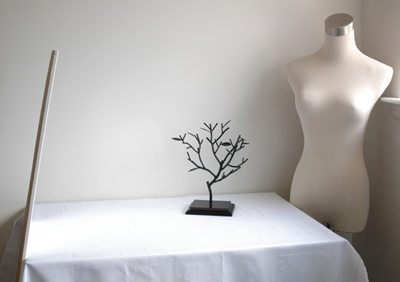
私は品物の写真は上のように窓際の机で撮影しているのですが、左側に大きな鏡が立てかけてあるの、お分かりですか? 肉眼ではそう違いはないのですが、写真で見ると鏡のあるところだけ随分明るくなっているのが一目で分かります。大きな鏡がなくても窓の反対側に大きな白い紙や布を設置するだけで同じ効果があります。これ一つあるだけで写真の印象が随分やわらかくなりますのでぜひ試してみてください。
I usually take my photos at a desk near a window, as shown in the photo above, but can you tell that I have a mirror propped up against the desk on the left hand side? It’s not very noticeable when you are looking at the set-up with your own eyes, but the area in front of the mirror is clearly brighter than the rest when a camera looks at it. If you don’t have a large mirror, setting up a large piece of white paper or cloth opposite your window will do the same trick. This simple trick will significantly soften the impression of your photographs, so try it!
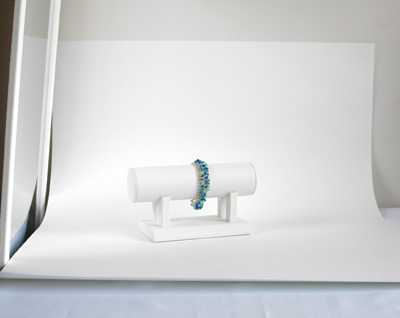
大きな紙や布は背景としてもすごく役立ちます。撮影している時には全然気付かなかったのにできた写真を見たら背景に変な物が写っていた、なんてよくある話です。白い机と白い壁の境目でさえ気になってしまうこともあるので大きな紙をうまく使って背景のごちゃごちゃを始めから隠してしまいましょう。写真のように紙の半分を品物の下に敷き、上のほうは壁に立てかけるようにするとキレイに撮れます。
A large paper or cloth will also come in handy as your backdrop. You’ve probably taken at least one picture that you thought was great, but had a distracting background when you looked at the actual photograph. Even the borderline between a white desk and a white wall can be distracting, so it’s much easier if you just cover up the background in the first place. You can get a simple and smooth background by placing half of the paper underneath your item and leaning the rest against the wall, as in the photo.
あとは品物にもっと近づく、真上・真正面からだけでなくいろいろな角度から撮ってみる、などすると目を引く写真が撮れるようになるはずです。
Other than that, if you get close to your item and shoot pictures from multiple angles (not just the front and the top); you’ll probably end up with nice, eye-catching photos.
Friday, June 3, 2011
品物の写真撮影 Photographing Your Products

ネットでお買い物した時のことを考えてください。本とかDVD等外見はどうでもいい品を買うなら別ですが、やはりたいていの場合は買う前に品物の写真をちゃんと見たと思います。ただ単にピンク色だと言われたってそれが淡いピンクなのか派手なピンクなのかは写真を見ないと分かりません。とくにEtsyでは手作りのものや一品物を販売することが多いので写真は絶対に必要です。実際「品物の写真はお店の命」と言ってもいいほどです。
Think back to the last time you purchased something online. Unless the outside appearance of the item was irrelevant to you, like if you were looking for books or DVDs, you most likely wanted to see pictures of the item before you purchased it. If the description only told you that the color was pink, you wouldn’t know if the item was soft pink or bright pink until you looked at the picture. Since you most likely will be selling handmade and one-of-a-kind items on Etsy, having good pictures is essential. In fact, it may not be too far fetched to say that your item pictures can make or break your store.
Etsyでは出品する際、一品5枚まで写真をアップロードできるようになっています。品物を手で触ることができないお客様のためにもなるべくたくさんの写真をいろいろな角度から撮りましょう。例えばハンドバッグを販売する場合にはこんな5枚を:
- 真正面から撮った写真
- バッグを開いて中のポケットなどが見えるように撮った写真
- 大きさが分かるようにモデルに持ってもらったり日常品をそばに置いて撮った写真
- 素材の質感が分かるようにぐんと近づいて撮った写真
- バッグの裏側や底の構造が分かるような写真
When you list an item on Etsy, you can upload up to 5 pictures per listing. Since your customers won’t be able to touch the item with their hands, make the photos as descriptive as possible. For example, here are the 5 pictures you might take if you are selling handbags:
- A straight on shot of the bag.
- A shot of the bag from the top to show the inside pockets, etc.
- A shot in which a model is holding the bag or it is next to an everyday object, in order to emphasize the item’s size.
- A close-up shot of the item to show off the texture of the material.
- A shot that shows the back or the bottom construction of the bag.

一枚目の写真はサムネイルとして色々なところで使われますので5枚の中からもっとも目を引くものを選びます。さて、ここが少し厄介なのですがEtsyでは作品のリストを見るときにGallery Viewで見るかList Viewで見るかをユーザーの好みで選択できるようになっていて、サムネイルもGallery Viewの場合は170x135ピクセルの長方形、List Viewの場合は75x75ピクセルの正方形とどちらを選んだかによって変わってしまいます。要するに長方形でも正方形でもきれいに見える写真を撮らなければいけないと言うことです。
The first picture of the listing will be used as a thumbnail in many areas of Etsy, so pick the most eye-catching one from the 5 photos. Now, this is where things get a little tricky, but on Etsy, a user can choose how to view a list of items, by “Gallery View” or “List View.” When you choose Gallery View, the thumbnail is a 170x135 pixel rectangle. But in List View, the thumbnail changes to a 75x75 square. In other words, you have to frame a picture so that it looks great both as a rectangle or a square.
たいていの方はこのため、始めから写真を正方形にトリミングしていらっしゃいます。そうすれば正方形のサムネイルにぴったりですし長方形の場合も上下がほんの少し切り取られるだけになります。横長の長方形の写真も使えますが170x135と同じ比率にトリミングしておかないと長方形のサムネイルでも両端を切り取られてしまいます。縦長の長方形は切り取られる面積が多くなってしまうのでお勧めできません。帽子を売っているのに肝心な帽子は切り取られていてモデルさんの顔しか見えない、なんていうサムネイルも時々見かけます。
For this reason, many people crop their photos as a perfect square from the beginning. This way, the square thumbnail looks exactly the way you intended it to look, and only a little bit of the top and the bottom will be cut off for the rectangular thumbnail. You can also use a rectangular picture if it’s horizontal, but unless you crop it to the same ratio as 170x135, some parts of your picture may be cut off even in the rectangular thumbnail. Vertical pictures are not recommended since large areas of your picture will be cut off in both types of thumbnails. I’ve seen listings for hats with only the model’s face in the thumbnail because the actual product was too close to the top of the picture and was cut off.
ちょうどいい形にトリミングできたら画像サイズを縮小して保存します。最低限でも横幅は570ピクセルなくてはいけませんが、たいていの方は800から1000ピクセルぐらいの大きさにしていらっしゃいます。そうすれば品の詳細ページの写真をクリックした時 写真が拡大され、お客様に作品の細かいところまで見せることができます。
Once you’ve cropped your picture to the right shape, reduce the image size and save it. The minimum width is 570 pixels, but many people resize the photos so that they are about 800 to 1000 pixels wide. This is because when you click on the pictures in the item description page, a new window opens up with a larger picture, allowing your customers to see your products in greater detail.
今週は長くなりすぎるので書きませんが、キレイな写真を撮るコツを来週少しご紹介したいと思っています。
I don't have enough space to write about it this week, but next week, I want to share with you some tricks for taking nice pictures of your product.
Friday, May 27, 2011
お店の準備 ~ Shop Policies ~ Getting Your Store Ready

Etsyのお店の準備を続けましょう。今週はお店の利用ガイドとなるPoliciesの話をします。
Let’s continue our preparation of your Etsy shop. This week, we’ll talk about your Shop Policies.
Policies は必ず記入する必要ないということですが、海外のSellerとしてはお客様に安心してお買い物をしていただくためにも やっておいたほうが絶対良いと思います。先週記入したInfo & Appearanceのページの上にPoliciesと書かれたタブがありますのでそこをクリックしてください。
Although you’re not required to fill out the Policies, you really ought to do it for your customer’s peace of mind, especially if you’re an international seller. You can access the page by clicking on the “Policies” tab on the top of the “Info & Appearance” page, which we filled out last week.
一番初めはWelcome Message。Policiesのページに来る方はたいていはもうすでにお店の品を見ており、買う時の注意事項を見たいと思って来ているので なるべく短いメッセージにしておきます。自己紹介などは別にプロフィールのページがあるのでそちらに書いてください。
The first thing to fill out is the Welcome Message. People who visit your policies page usually have already seen your items and came to make sure your policies are reasonable, so keep this one short. Lengthy introductions are better suited for your Profile page.

次はPayment Policyです。どんな支払い方法が利用できるのか説明しておきます。クレジットカードでの支払いもPaypal を通してできるので「Paypalのみ」と言うSellerが多いですがたまにGoogle Checkoutも利用できるようにしている方もいます。その場合はどうやって支払いを済ませるのかしっかり書いておきYour AccountのShipping & PaymentページからPayment Methodsのタブをクリックし、Payment Methods you Acceptの中から「Other」を選択しておくこともお忘れなく。Paypalのみ、と言う方もPayment Methodsのページに行きPaypalしか利用できないようになっているかチェックしておいてください。Money OrderとPersonal Checkも選択肢の中にありますが海外からだとものすごく時間がかかりますし手数料も相当取られるのでお勧めできません。
Next is the Payment Policy, where you can explain the payment options available. You can use Paypal to make a credit card payment too, so most people only accept Paypal, but there are some who offer Google Checkout. In that case, you should explain the procedure you and your customer will have to make in detail. Also, don’t forget to go to the Payment Methods tab in the Shipping & Payment page in Your Account, and check the box next to “Other”. Even if you only accept Paypal, it’s a good idea to go to the Payment Methods page and double check that only “Paypal” is selected in Payment Methods you Accept. You can also choose to accept money order and personal checks, but it’s not recommended for international sellers since it could take a long time and may incur outrageous fees.
Shipping Policyには支払いから何日以内に品物を発送するか、速達で配送してもらいたい時はどうしたらいいのか、もしも関税をかけられてしまった時それを払うのは誰の責任になるのか等なるべく詳しく書いておきます。
In the Shipping Policy, try to touch on as many shipping related questions or problems that may occur, such as your usual time frame for shipping out items, what to do if the customer wants expedited shipping, and who will be responsible for paying the customs fees or other taxes if there are any.
Refund Policyには交換、返品、返金などに関した説明を書きます。品によっても変わってくるのでどの方針が一番良いとは言えませんが、返品は可能なのか交換しかできないのか、余計にかかる送料は誰が負担するのか、何日以内に返品しなければならないのかなどをしっかりと説明しておいてください。
In the Refund Policy, clearly state what your stance is in regards to exchanges, returns, and refunds. The best policy will differ depending on what you sell, but some of the things you should explain include whether you accept returns or only offer exchanges, who will pay for the extra shipping charges, and if there is a time limit on when you can return an item.
もし他にも注意事項があるのならばAdditional Informationに記入します。例えばここに「日本から発送するので、税関の検査に時間がかかり普段より遅れて届くこともあります」のようなことを念のため書いていたほうが良いかもしれません。
If there are any other information that your customers should know, put it in the Additional Information. For example, you may want to reiterate here that you will be shipping the item from Japan, so the package may be delayed due to customs inspection.
Etsyのこちらの記事にもPoliciesにどんなことを書けば良いのか説明してありますので読んでみてください。
There’s also an Etsy article about what to write in your Policies page:
http://www.etsy.com/storque/seller-handbook/service-tips-for-sellers-creating-policies-that-work-2095/
Friday, May 20, 2011
お店の準備 ~ Info & Appearance ~ Getting Your Store Ready

先週アバターを作成しましたがEtsyに出品しだす前にやっておくお店の準備は他にもたくさんあります。今日はYour AccountからShop Settingsと言う項目の下のInfo & Appearanceページを選択し、記入してみましょう。
Last week, we talked about creating your avatar. But before you can start listing items on Etsy, there are still many more preparations that need to be done. Today, let’s fill out the Info & Appearance page, which you can access by going to Your Account, and looking under Shop Settings.

上から見ていくとAbout Your Shop, Shop Info, Shop Banner Image, Message to Buyersとあります。About Your Shopには何も記入する欄がないので次のShop Infoに行きます。まず一番にShop Titleとありますが、ここにはどんな物を売っているのかとても短い説明を書きます。Googleなどの検索エンジンは真っ先にここを探すので、見つけてもらいやすくするためになるべくお客様が使いそうなキーワードを入れておきます。Shop Announcementのほうは長くても短くてもかまいませんが、始めの二文ぐらいにはやはりキーワードをたくさん盛り込んでください。すぐ下にGoogleで検索した時にどういう風に見えるのかというPreviewが見れるようになっています。
This page has several sections: About Your Shop, Shop Info, Shop Banner Image, and Message to Buyers. We’ll skip About Your Shop since there’s nothing to fill out there and move on to Shop Info. The first area to fill out is Shop Title, which is where you’ll briefly explain the type of items you are selling. This is what Google and other search engines will look at first, so use as many keywords as possible to make it easier for your customers find you. The Shop Announcement doesn’t have to be as short, but it’s still recommended that you include quite a few keywords in the first 2 sentences or so. Just under that, you’ll be able to see a preview of what your store will look like on Google.

Shop Bannerは看板のようにお店の一番上に貼られます。アバターとの統一感を保つためにも最低限似たような色彩を使い760x100ピクセルのサイズで作成してください。たいていの方はお店の名前と商品の写真を合わせたバナーです。特に長いユーザー名になってしまった方には「こことここにスペースが入るんだよ」と見せるいい機会だと思います。アバター同様.jpg 、.gif 、または.pngファイルとして保存しアップロードします。
Shop Banner is the sign that will be placed at the top of your store. Use at least a similar color scheme as your avatar to maintain consistency in your store, and make sure the size is 760x100 pixels. Most people use a picture of their product and include the name of their store. This is especially important for those of you with longer usernames, since you’ll be able to show your customers where the spaces are suppose to be. Just like the avatar, save it as .jpg, .gif, or .png file and upload it on this page.

最後はMessage to Buyersです。こちらはお店の品が売れた時Invoiceに必ず表示されます。どのお客様も同じ文を読むことになるので、あまり細かいことは書かずお礼とメールアドレスぐらいにしておきます。私は後から必ず別のConversationをお客様に送り、そちらに「O日に小包を発送した」などもっと詳しいことを書いています。
The last section is the Message to Buyers. This is something that will be included in the invoice each time you sell an item. Since all of your customers will be reading the same thing, try to keep it general. For example, write a brief thank you note and give them an email address that they can use if they need to contact you. I always send a separate Conversation to my customers later, giving them more specific info, such as when I sent the package and the tracking number if there are any.
全欄記入したら一番下の青いSaveボタンをクリックすることをお忘れなく。忘れるとせっかく記入したものが全部消えてしまいます。
Once you are done filling out all the sections, don’t forget to press the blue Save button at the bottom! If you don’t, all the info you put in will completely disappear.
Friday, May 13, 2011
アバターの作成 Creating Your Avatar

そろそろ本格的にEtsyのお店を開く準備をしましょう。ユーザー名が決まったなら次に大事なのはアバター(プロフィール写真)です。アバターはお店以外にもユーザーの検索、提示版のForums、メールサービスのConversations等いろいろな場で使われます。大きさはたったの75x75ピクセルで小さなものですが、お店を持っているユーザーにとってはとても大切なショーウィンドーだと私は思っています。
Well, it’s probably about time that we start getting your Etsy store ready in earnest. Now that you’ve selected your username, next on your to-do list is creating your avatar, or profile picture. Your avatar will be used not only in your store, but in many areas such as user search, Forums, and Conversations. It’s only 72x72 pixels in size, but it is going to be a very important window into your store.
前、ユーザー名を選ぼうLet’s Choose your Usernameで言いましたが自分の名前や好きな言葉のユーザー名を選んだ場合、一番の欠点はどんな物を販売しているのか一目では分からないということです。やはりそういうユーザー名の方は売り物の写真をアバターとするのが最も有効かと思われます。それもなるべく一品物ではなく何度でも作り直せる品を選ぶことをお勧めします。一品物だとその品が売れる度にアバターを変えなければいけなくなります。
I’ve mentioned this in the "ユーザー名を選ぼう Let’s Choose Your Username" article, but one of the biggest weaknesses with usernames based on given names and favorite words is that you can’t tell what the store is about just by looking at the username. Using a picture of your product as an avatar is probably the most effective for those of you who chose those usernames. In fact, you should try to select a product that you can remake over and over again, since if you choose a one-of-a-kind item, you’ll have to change your avatar every time it sells.
 プロフィール写真なんだからやっぱり顔写真が見たいと言う方も少なからず居られます。Etsyユーザーにとってコミュニティー感覚はとても大切なのでただの「お店とお客」関係ではなくその裏にいる人のことをもっと知りたいと言う思いが強いようです。特に品物の名前を使ったユーザー名の方は顔写真のアバターにすることを検討してみてください。
Many users prefer to see the actual person in the profile pictures, too. The feeling of a community is an important part of Etsy for many users, so they like to get to know the person behind the shop. If your username is based on what you are selling, you might want to consider using your own photo to add a warmth of human touch.
もし洋服やアクセサリーなど身につけられるものを売っているのだったら、それを着用した自分の写真をアバターとして使うのが一番良いのかもしれません。
If you sell items that you can wear, such as clothing and accessories, using a photo of yourself wearing your own products maybe the best solution for you.
後は自分でデザインしたロゴ、子供やペットの写真などをアバターとして試用していらっしゃる方もいます。ロゴは人によってはうまく使っていらっしゃる方も居られますが、いいものをデザインするのはちょっと難しいです。実は私も始めはロゴをアバターとして使っていたのですが、やはり何を売っているのか分からないと指摘され数ヶ月後ブレスレットの写真に変えました。子供やペットの写真などは子供服やペット用品をを売っていると勘違いされるのでそういうお店を開く場合以外はあまりお勧めできません。
There are also others who use their store logo or pictures of their children and pets as their avatars. Store logo can be used successfully, but it depends heavily on the actual design. Originally, I used a logo for my avatar too, but ended up changing it a few months later when someone pointed out that it was hard to tell what I was selling. As for pictures of your children or your pets, it’s probably best to stay away from them since most people will assume that you’re selling kids’ clothing or pet-related items.
 好きなアバターが出来上がったら.jpg 、.gif 、または.pngファイルとして保存しYour AccountからPublic Profileページに行きアップロードします。セールの期間中だけアバターを変えて「15%Off!」などと宣伝することもできます。
Once you’ve created your avatar, save is as a .jpg, .gif, or .png file and upload it via “Your Account > Public Profile.” You can also replace the avatar with a special avatar during a sale.
もしもアバターなどどうやって作成したらいいのか全く分からない、と言うのであればデザインサービスを提供している方もEtsyにたくさんいらっしゃいます。たいていの場合アバターやバナーなどをパッケージとして販売していらっしゃるので検索してみてください。
If you don’t feel comfortable creating your own avatar, there are many Etsians who offer custom design service. They often offer a package with avatars and banners, so try searching for them.
Friday, May 6, 2011
Etsyの会員登録 Registering with Etsy
さあ、Etsyで販売する品物が徐々に揃ってきた頃だと思います。好きなユーザー名も決まったならEtsyの会員登録をしましょう。無料ですしとても簡単です。
By now, you’ve probably started accumulating items to sell on Etsy and have chosen a username that you like. I think it’s time to register with Etsy! It’s very easy and won’t cost you a dime.
 Etsyではどのページにも左上のロゴのすぐ横にRegisterと書いてあるグレーのボタンがあります。クリックすると下のようなページに行きます。一番先に名前(First NameとLast Name)を記入する欄がありますがこちらは記入する必要は全くありません。むしろ一度記入すると、結婚して苗字が変わったりした場合 わざわざスタッフに連絡して変えてもらわなくてはいけないので面倒です。本名を一般に公開したくない方もニックネームなどを記入するより空欄のままにしておくほうが無難でしょう。性別も公開したくなかったらRather not sayを選択してください。
On every page on Etsy, there’s a gray Register button right next to the logo on the upper left corner. If you click that, you’ll be taken to a page that looks like the picture below. The first two fields ask you to put your first and last name, but these fields are actually optional. In fact, if you need to change your name, due to marriage for example, you’ll have to contact the staff and get the name change approved, so it’s a bit of a hassle. Those of you who don’t want your real name made public should just leave it blank, rather than entering a nickname. You can also choose to keep your gender private by clicking “Rather not say.”
 次はメールアドレス(Your Email)とパスワード(Password)。お店を開くつもりなら専用のメールアドレスを新しく作成することをお勧めします。パスワードは大文字、小文字、数字、記号を使い6文字以上にしてください。確認のためパスワードをもう一度記入したら(Confirm Password)4文字から20文字までのユーザー名(Username)を選びます。大文字・小文字と数字は使えますが記号やスペースは使えません。「Etsy」と言う言葉、それから差別用語を使うことも禁止されています。ユーザー名をまだ選んでいない方は「ユーザー名を選ぼう Let's choose your Username」を読んでみてください。
Next, you’ll need your email and password. Since you’re planning to open a shop, I highly recommend that you open a new email account specifically for the business. The password needs to be at least 6 characters long, made up of upper and lower case letters, numbers, and/or symbols. Once you’ve confirmed your password, choose a username between 4 to 20 characters. You can use upper and lower case letters and numbers, but you’re not allowed to use symbols or spaces. Also, you cannot include the word “Etsy” or any offensive language in your username. If you need help picking the perfect username, please go back and read “ユーザー名を選ぼう Let's choose your Username.”
あとは青いRegisterのボタンをクリックしてEtsyから登録確認のメール(Etsy
Account Cofirmation)が届くのを待ちます。確認メールには特別な長いURLが書いてあるのでそれをクリックし「You’re in! Thanks for confirming your Etsy account.」というメッセージが見えれば会員登録は完了です。こちらのEtsyの記事も参考にしてください: http://www.etsy.com/help/article/244
Now, all you need to do is click the blue Register button and wait for the Etsy Account Confirmation to arrive at the email address you entered. Click the special URL in the confirmation email, and your registration is complete if you see a message that reads “You’re in! Thanks for confirming your Etsy account.” If you have any trouble, you can also look at the following article: http://www.etsy.com/help/article/244
 Etsyでお店を開くにはそれからSellページにいき右端のSell on Etsyと書いてある青いボタンを押します。Sellerとして登録する時には必ず本名と住所、それからクレジットカードを記入しなければなりません。クレジットカードはVisa、MasterCard、DiscoverかAmerican Expressしか使えません。Seller登録は別に会員登録と同じ日にする必要はなく、実際に登録した日付はお店に「Opened on April 2, 2009」などのように表示されますので準備が十分整ってからやってください。
To open a store on Etsy, you then need to go to the Sell page and click on the blue button that reads “Sell on Etsy” on the right. To register as a seller, you do have to provide your real name and address as well as a valid credit card. Only Visa, MasterCard, Discover, and American Express are accepted, but if you have a debit card with a Visa or MasterCard logo, that will work too. It’s not necessary for you to register as a seller right away. The date that you complete the seller registration will show up as the “Opened on” date in your Etsy store, so it’s actually better to wait until you have most everything ready to go.
前にも言ったように支払いはたいていの場合Paypal を通してされるのでそちらのアカウントも開設しておいたほうが良いと思います。Paypalの新規登録は日本語サイトでできるのでわざわざこの場で解説しませんが、プレミアかビジネスのアカウントを開いてください。
As I mentioned before, most customers will make payment through Paypal, so you should open an account there too. I’m not going to do a step-by-step instruction for Paypal here, but do make sure that you open a Premier or a Business account.
By now, you’ve probably started accumulating items to sell on Etsy and have chosen a username that you like. I think it’s time to register with Etsy! It’s very easy and won’t cost you a dime.
Etsyではどのページにも左上のロゴのすぐ横にRegisterと書いてあるグレーのボタンがあります。クリックすると下のようなページに行きます。一番先に名前(First NameとLast Name)を記入する欄がありますがこちらは記入する必要は全くありません。むしろ一度記入すると、結婚して苗字が変わったりした場合 わざわざスタッフに連絡して変えてもらわなくてはいけないので面倒です。本名を一般に公開したくない方もニックネームなどを記入するより空欄のままにしておくほうが無難でしょう。性別も公開したくなかったらRather not sayを選択してください。On every page on Etsy, there’s a gray Register button right next to the logo on the upper left corner. If you click that, you’ll be taken to a page that looks like the picture below. The first two fields ask you to put your first and last name, but these fields are actually optional. In fact, if you need to change your name, due to marriage for example, you’ll have to contact the staff and get the name change approved, so it’s a bit of a hassle. Those of you who don’t want your real name made public should just leave it blank, rather than entering a nickname. You can also choose to keep your gender private by clicking “Rather not say.”
次はメールアドレス(Your Email)とパスワード(Password)。お店を開くつもりなら専用のメールアドレスを新しく作成することをお勧めします。パスワードは大文字、小文字、数字、記号を使い6文字以上にしてください。確認のためパスワードをもう一度記入したら(Confirm Password)4文字から20文字までのユーザー名(Username)を選びます。大文字・小文字と数字は使えますが記号やスペースは使えません。「Etsy」と言う言葉、それから差別用語を使うことも禁止されています。ユーザー名をまだ選んでいない方は「ユーザー名を選ぼう Let's choose your Username」を読んでみてください。Next, you’ll need your email and password. Since you’re planning to open a shop, I highly recommend that you open a new email account specifically for the business. The password needs to be at least 6 characters long, made up of upper and lower case letters, numbers, and/or symbols. Once you’ve confirmed your password, choose a username between 4 to 20 characters. You can use upper and lower case letters and numbers, but you’re not allowed to use symbols or spaces. Also, you cannot include the word “Etsy” or any offensive language in your username. If you need help picking the perfect username, please go back and read “ユーザー名を選ぼう Let's choose your Username.”
あとは青いRegisterのボタンをクリックしてEtsyから登録確認のメール(Etsy
Account Cofirmation)が届くのを待ちます。確認メールには特別な長いURLが書いてあるのでそれをクリックし「You’re in! Thanks for confirming your Etsy account.」というメッセージが見えれば会員登録は完了です。こちらのEtsyの記事も参考にしてください: http://www.etsy.com/help/article/244
Now, all you need to do is click the blue Register button and wait for the Etsy Account Confirmation to arrive at the email address you entered. Click the special URL in the confirmation email, and your registration is complete if you see a message that reads “You’re in! Thanks for confirming your Etsy account.” If you have any trouble, you can also look at the following article: http://www.etsy.com/help/article/244
Etsyでお店を開くにはそれからSellページにいき右端のSell on Etsyと書いてある青いボタンを押します。Sellerとして登録する時には必ず本名と住所、それからクレジットカードを記入しなければなりません。クレジットカードはVisa、MasterCard、DiscoverかAmerican Expressしか使えません。Seller登録は別に会員登録と同じ日にする必要はなく、実際に登録した日付はお店に「Opened on April 2, 2009」などのように表示されますので準備が十分整ってからやってください。To open a store on Etsy, you then need to go to the Sell page and click on the blue button that reads “Sell on Etsy” on the right. To register as a seller, you do have to provide your real name and address as well as a valid credit card. Only Visa, MasterCard, Discover, and American Express are accepted, but if you have a debit card with a Visa or MasterCard logo, that will work too. It’s not necessary for you to register as a seller right away. The date that you complete the seller registration will show up as the “Opened on” date in your Etsy store, so it’s actually better to wait until you have most everything ready to go.
前にも言ったように支払いはたいていの場合Paypal を通してされるのでそちらのアカウントも開設しておいたほうが良いと思います。Paypalの新規登録は日本語サイトでできるのでわざわざこの場で解説しませんが、プレミアかビジネスのアカウントを開いてください。
As I mentioned before, most customers will make payment through Paypal, so you should open an account there too. I’m not going to do a step-by-step instruction for Paypal here, but do make sure that you open a Premier or a Business account.
Friday, April 29, 2011
困った時に If you Need Help

さて来週からEtsyの会員登録の仕方、出品の仕方等の具体的な話を一段階ずつしていきたいと思っていますが、その前に、これでいいのかと疑問がわいてきたり すぐに対応しなくてはならない問題が起こっててしまった時 どうしたらいいか説明しておいたほうがいいかなと思います。
Starting next week, I want to start writing step-by-step instructions on the Etsy basics, such as registering and listing an item. But before that, I think I should mention where you could find answers if you ever have question or problems on Etsy.
Etsyは人気の高いサイトですので たいていの場合すでに他の誰かが似たような経験をしたり、似たような疑問を抱いたりしています。どこを探せばいいのかさえ知っていれば、わざわざ毎回スタッフにメールを送らなくても簡単に答えは見つかります。
Since Etsy is such a popular site already, someone else has most likely already encountered the same problems that you’re having or asked the same questions you are asking. If you know where to look, you can easily find answers on your own, instead of emailing the staff every single time.
Etsyに関する質問だったらまずはFAQを検索してみましょう。特にお店を開くことに関する質問はこちらです: http://www.etsy.com/help/topics/#Open_a_Shop FAQで回答を見つけられなかったりEtsy以外のことで疑問があったときは(例えばPaypalに関する疑問)私はForumsを検索します。
If you have questions about using Etsy, the FAQs should be the first place you search. If your questions are specific to selling on Etsy, you can look for your answers at: http://www.etsy.com/help/topics/#Open_a_Shop. If I can’t find the right answer there, or if I have questions about something other than Etsy (about a problem on Paypal, for example) I search in the Forums.

Forumsは要するにEtsyの提示板。Etsyのロゴの上のCommunityリンクからアクセスできます。Announcementにはスタッフ(EtsyではAdminと呼ばれています)しか書き込むことができませんが、他のSite Help、Business Topics、Ideas、Bugsにはユーザー誰でも書き込むことができます。検索しても答えが見つからないのであれば、自分から質問してみましょう。たいていはすぐに回答が戻ってきます。
Forums is Etsy’s discussion board. You can access it through the Community link, above the Etsy logo on each page. Only Etsy administrators (Admin for short) are allowed to post in the Announcement section, but all users can post in the Site Help, Business Topics, Ideas, and the Bugs sections. If you still can’t find your answer in the Forums, you should post a new topic yourself. In most cases, your fellow Etsians will write back almost immediately.
日本から海外へ品を送る時の質問や一定の技術に関する質問など、ちょっと普通のEtsyのユーザーの方々には答えられない疑問がある場合はForumsよりはTeamsのDiscussion に質問を投稿したほうが詳しい答えを得られます。Teamsとは同じ興味を持ったユーザーの方々が個人で始めたクラブみたいなものでForums と同じくCommunityのページからアクセスできます。今回写真を使わせていただいたFurugiStarさんも私もEtsy JapanというTeamのメンバーです。特に日本在住のユーザーに質問してみたいという方にはEtsy Japanをお勧めします。
If you have a very specific question that an average user may not be able to answer, regarding shipping from Japan or using a certain technique, for example, you might want to try posting your question in a Team discussion. Teams are clubs started by individual users around a common interest, and can be found in the Community page, just like the Forums. FurugiStar, whose items are shown alongside the post this week, and I are both members of the Etsy Japan team. If you have questions that are specific to selling from Japan, I recommend that you join Etsy Japan.
それでも答えが見つからないのならばやはりEtsyのスタッフにHelpページを通して質問してください。実は最近、スタッフの方とチャットができるようになったのですが今のところ日本時間の夜の11時から朝の7時までしか使えません。メールのほうが時間がかかりますが、簡単かもしれません。
Even after that, if you still can’t find an answer to your question, then it’s time to contact the Etsy staff through the Help page. They’ve recently introduced a live chat tool in the Help page, but right now, it’s only available between 11pm to 7am Japan standard time. If you are located in Japan, it may be easier to email them, even if it takes a little longer to get the answer.
Friday, April 15, 2011
Etsyのお店を開く前に Before You Open Your Etsy Shop

さて皆様はEtsyでどんなお店を開きたいと思っていらっしゃいますか? やはり自分の力や興味を生かした作品を出品したいですよね。でもキレイな物や可愛い物が作れるというだけで、他のことを何も考えずにお店を開いてもなかなかうまくいかないものです。個人で売るのも商売は商売。しっかり勉強してから開店したほうが後からジタバタせずにすみます。
What kind of store are you planning to open on Etsy? You, of course, want to sell items that take advantage of your skills and interests, right? But just because you can make things that are pretty and cute, doesn’t mean that you’ll soon have a successful store, if you open it without much thought. Even though you’ll be operating it by yourself, a business is a business. If you do your homework before you open your shop, you’ll be able to avoid the hassle later.

そこでまず競争相手がどんなものを売っているのか検索してみてください。似たものを売っている方はどのくらいいますか? どんな値段で売っていますか? 送料はどのくらいですか? 競争相手が多ければ多いほど売るのは難しくなりますし、海外からだと送料も国内の方の倍以上かかったりします。おまけに他の国に比べると作品を作るための材料の値段がもともと少し高いので、作品の値段が高めになってしまうのもやむを得ないと思います。それでも自分の作品は売れる、と言う自信はありますか?
So, let’s begin by searching what your competitors are selling on Etsy. How many sellers are carrying items that are similar to yours? At what price? How much are they charging for shipping? More competition means your customers will have a harder time finding you. As an overseas seller, your shipping charge will be double that of a domestic seller. In addition to that, in Japan, the cost of materials is a little higher than many other countries to start with, so it’s probably inevitable that the price of your items will be a little higher too. Do you feel confident that your items will sell, even with those conditions?
作品の値段を決める前に計算しておかなくてはならない出費は材料や送料以外にもあります。海外に郵送するためしっかりとした梱包用品が必要です。また、Etsyには出品した時に20セント、それから品物が売れた時に値段の3.5%を手数料として払います。品物の支払いはほとんどの場合Paypalを通してされるのでそちらにも手数料を払うことをお忘れなく。今のところ国外の売り上げには30セント+3.9%の手数料がかかります。50ドルの品を出品した時に20セント取られてもそう売り上げに大きな影響はないですが、2ドルの品を出品した時に同じ20セントを取られると痛いですよね。安いもののほうが売れやすいのは確かですが、あまりにも安いと商売にはなりません。
Before you decide on the price of your items, you’ll also have to calculate a few other costs besides materials and shipping. Because you’ll be shipping abroad, you’ll need some durable shipping supplies. Also, you’ll have to pay 20 cents to Etsy each time you list an item and 3.5% of the selling price when an item sells. Don’t forget, you’ll have to pay Paypal fees, too, since most customers will make the payment through them. At this time, international sales incur 30 cents plus 3.9% of the total money coming in. 20 cents might not seem like much if you list a $50 item, but it hurts a little if your item is $2, and they still take the same 20 cents. It is true that cheaper items sell better, but it doesn’t make much business sense to sell items that are too cheap.

よく似たものを売っている人がたくさんいる、と言うのもちょっと問題です。特にJewelryやArtのカテゴリーは競争が激しく、お客様に一品を見つけてもらうだけでも難しいんです。私もEtsyを始めたばかりの頃はそれを知らず、苦労しました。今は白いビーズを使った品をWeddingsのカテゴリーに出品したり、競争がちょっと少ないChainmailleのカテゴリーに出品できる品を多く作ったりとできるだけたくさんの方に見てもらえるようにしています。
Having too many other sellers selling very similar items can be a problem too. The Jewelry and the Art categories, especially, are brimming with competition, and it’s quite hard to have even one of your items be found by the right customer. I didn’t know this either when I first started Etsy, and have had to make some adjustments. Now, I list jewelry made with white beads in the Weddings category, and have increased the number of items that can be listed in the Chainmaille category, as the competition is a little less fierce there.

絵を描く方や写真家の方もオリジナルやプリントだけではなく絵付きのグッズなどを売ることでお客様の層を増やしていらっしゃいます。今回絵を使わせていただいた札幌のdosankodebbieさんもとても面白い「絵手紙」と一緒に絵葉書やマグネットなどを販売していらっしゃいます。自分で描いた絵や自分で撮った写真を使う場合に限って、他の業者の方に頼んで印刷してもらった品も手作りとして売ることを許されていますので他にも手提げ、ペンダント、シールなどを販売している方もいらっしゃいます。
Painters and photographers can reach customers from different demographics by offering not only originals and prints, but everyday goods with their art printed on them. Dosankodebbie from Sapporo, who graciously allowed me to use her images today, offers postcards and magnets along with her very interesting “Etegami” or illustrated mail. Items such as tote bags, pendants, and stickers with your images printed by a third party are also allowed in the handmade section if, and ONLY if, you are the creator of the image.
あくまでも他人が撮った写真やよく知られているキャラクターのまねをして描いた絵を使うなど著作権法に反するようなことはやらないでくださいね! 確かにEtsy内でもそういった品を残念ながら見ますが、明らかに規則違反です。お店を開く前に必ずEtsyのTerms of UseとDos and Don’tsをしっかり読み、質問があったらsupport@etsy.comに直接メールしてください。
Please respect the copyright law, and refrain from using photographs taken by someone else or copying a well known character! Unfortunately, we do see items like that on Etsy too, but they are clearly against the rules. Before you open your shop, be sure to read the Terms of Use and Dos and Don’ts thoroughly, and if you have any questions, contact the Etsy staff directly at support@etsy.com.
P.S. If you want to learn more about Japanese culture, I highly recommend that you visit dosankodebbie's blog! You can see many many more of her beautiful work, and even I've learned a few things about Japanese culture.
Friday, April 8, 2011
Etsyとは? What is Etsy?

さて先週の記事でEtsyのことを日本語で書いてみたい、と言いましたが まずEtsyとはどんなサイトなのか、どんな物を売れるのか知らないと話は進みません。
As I said last week, I want to write about Etsy in depth, but before we talk about anything else, you have to understand what Etsy is and what you can sell on Etsy.
Etsyは「手作り」専門のマーケットサイト。個人で物が売れるところはeBayまたはヤフオクに似ていますが、オークションサイトではないので売り手が自分で決めた価格で販売しています。Etsyが公開した「Weather Report」によると今年の2月だけでもサイト内合わせて1,850,525個の品物が売れたそうです。売り上げにするとなんと3440万ドル、1ドル=85円で約29億円ちょっとになります。
Etsy is an online marketplace with a focus on handmade. It is like eBay and Yahoo Japan auctions in that an individual can list items to sell, but Etsy is not an auction site, so the price is fixed according to what the seller finds appropriate. According to their "Weather Report," a total of 1,850,525 items were sold in February of this year alone. They sold for about 34.4 million U.S. dollars total, or about 2.9 billion Yen when calculated at $1=¥85.
Etsyは「手作り」で知られていますが、実は売っているもの全てが手作りと言うわけでもないんです。では、どんな物を売ることができるのかカテゴリー別に見てみましょう。
Etsy is known for handmade, but not everything sold actually has to be handmade. So, let’s look at what you are allowed to sell on Etsy by category.
まずはこれがなければEtsyは語れないと思うカテゴリー「Handmade」。文字通り手作り、それも自分で作ったものでなければこのカテゴリーには出品してはいけません。いくら手作りでも 他人が作ったものを出品することは禁止されています。自分で作ったものであり、手で触ることができる(tangible)と言う条件を満たせば ボタンのような小物から家具などの大きなものまで何でも売ることができます。福岡からEtsyを使っていらっしゃるfromshinoさんは古い帯や帯締めをつかって上の写真のような素敵なバッグを作っていらっしゃいます。こういう風に古着などをを新しい物にリファッションすることはEtsyではUpcycleと呼ばれ、人気があります。
Etsy is not Etsy without the Handmade category. Everything listed here, obviously, must be handmade and must be made by you. You cannot list something made by someone else even if it is a handmade item. If it is handmade by you, and if it’s tangible, you can sell anything from a tiny button to giant furniture. Fromshino, who uses Etsy from Fukuoka, makes beautiful bags out of vintage obi sashes and obi cords, as seen in the photo above. In the Etsy community, you'll often hear the term "upcycle" in relation to items that have been repurposed like this, and they are rather popular.
 手で触ることができる、という中にはコンピュータ-のマウスで「触れる」デジタルファイルも入ります。静岡のBirdieBrownさんは可愛らしいイラストのデジタルスタンプを販売していらっしゃいます。他には自分でデザインした編みぐるみの作り方を説明したPDFのファイルやロゴやバナーのデザインサービス等を販売している方もいらっしゃいます。自分でプリントする紙人形なんかも見たことあります。デジタルファイルはたいていがお手ごろな値段ですし、メールで送受信できるので送料もかからず、海外のお客さんも違和感なく買えるようです。
Digital files that can be “touched” with a computer mouse are also considered tangible by Etsy. BirdieBrown from Shizuoka sells adorable digital stamps of her own illustration. Other popular digital files include istructional PDFs of your own amigurumi design and custom designed logo and banner services. I’ve even seen paper dolls that can be printed at home by the customer. Digital files are a great no-hassle option for overseas users as they are often affordable and require no shipping charges, since they can be emailed directly.
「Supplies」のカテゴリーでは手芸・工芸用品や布、シールや料理用品なども売れます。特に日本のかわいらしい小物は大人気でなんと「Kawaii」がごく普通にキーワードとして使われています。日本語の手芸の本でさえも写真が多く載っていれば見ながら作れる、と言って買われる方も多いようです。
In the Supplies category, you can sell things such as craft supplies, fabric, stickers, and even kitchenware. Cute knick-knacks from Japan are especially popular, so much so that “Kawaii” has become a well known tag word. Many even purchase craft books written in Japanese if there are lots of pictures to guide them.

EtsyにはHandmadeとSuppliesの他にもう一つ「Vintage」のカテゴリーがあります。こちらは20年以上前に作られたものなら、手作りや手芸関係でなくても売ることができます。着物や焼き物、骨董品のほか一昔前のサンリオのような懐かしの品もEtsyに見られます。そんなもの海外の人知ってるの?と思われるかもしれませんがサンリオやアニメ関係のものは古くても意外とよく知られています。このアトムのバッジを販売しているSandshoevintageさんもオーストラリア出身です。
Along with Handmade and Supplies, there is one more category for Vintage items. Here, you can list anything that is at least 20-years-old, even if it’s not handmade or related to crafting. In addition to kimonos, pottery, and antiques, I’ve seen nostalgic items such as older Sanrio on Etsy. You might wonder if anyone outside of Japan would know them, but Sanrio and Anime characters are surprisingly well known. The seller of the Tetsuwan Atom badge shown, Sandshoevintage, is actually from Australia.
随分長くなってしまいましたがそれでもほんの少しの例を挙げただけ。とにかくまずEtsyに行ってどんなものが売れているのか自分で見てみてください。Shop Localと言うツールがありますのでそれを使って日本人のお店を見つけることもできますしPounceと言うツールの中でJust Soldを選択すると実際最近何が売れたのか見ることもできます。
This post has gotten rather long, but I still was only able to give you just a few examples. I urge you to go to Etsy and see what kind of items are selling with your own eyes. You can search for other Japanese sellers using the tool called Shop Local, or choose the Just Sold option in the Pounce tool, and see exactly what was purchased on Etsy recently.
Monday, April 4, 2011
2 Years on Etsy!!

It's already been 2 years since I opened my little Etsy shop, and I have to say, I'm so glad that I did! It's so exciting to make something with your own hands, and to be able to sell it to someone who appreciate your efforts is just an icing on the cake!
Thank you to all of my customers and to those of you who have been supportive for the past 2 years!! I can't wait to see what the next year brings.
In the mean time, please enter the promo code "2YEARSALE" during check out to get 15% off of your entire order! This code is good until the end of April.
Friday, April 1, 2011
「手作り」で日本を復興しませんか? Let’s Rebuild Japan with “Handmade”
東日本大震災が起こってから早くも3週間経ってしまいました。被災した方々の苦労、悲しみを思うと本当に胸が痛みます。日本、そして世界中の多くの方が同じ思いと察しますが、私も寄付以外にも自分にできることはないか、どうしたら日本の皆様の役に立てるかいろいろ考えてみました。
It’s already been 3 weeks since the massive quake and tsunami struck Eastern Japan. My heart breaks when I think of the challenges and the devastation the survivors are facing. I’m sure many people around the world did the same, but I’ve been trying to figure out if there’s anything I can do for Japan, in addition to making donations.
で、たどり着いたのが実は私もやっている手作り品のマーケットサイト、Etsy(エッツィー)なんです。今、日本では地震、津波のダメージと計画停電のため工場の機械が動かせず、生産量が少なくなっています。計画停電もいつまで続くのか分からない常態です。でも手作りだったら電気や機械がなくてもいろいろな物を作れますし、ミシンなどの機械が必要な方でも布を切ったり品物の写真を日光の明かりで取ったりと停電の間できることはたくさんあります。手縫いだってできますよね。
Well, in the end, my thoughts turned to what I know, and that was Etsy. Currently, Japan’s manufacturing rate is quite diminished due to the earthquake and tsunami damage as well as the rolling blackouts. And unfortunately, the blackouts will probably last well into the summer and beyond. But when you are making things by hand, you can create lots of things without electricity or machines. Even those crafters who need machines, like sewers, can still cut cloth or take photos of products during power outages. And of course, sewing by hand is an option too!
日本人は手先が器用な方が多いです。趣味でやっているだけ、と言いながらとても質の高い作品を作っている方がたくさんいらっしゃいます。日本だけにしか見られない工芸もたくさんあります。震災直後にも竹を割ってお箸やお湯飲みを作っていられる被災者の方々の姿を見ました。そんな日本人にEtsy はぴったりなのです。
There are many crafty people in Japan, and they tend to make high quality items, even those who claim to do it only as a hobby. There are also many traditional handmade crafts that are only found in Japan. Even mere days after the quake, some of the survivors at an evacuation center were splitting bamboo from the neighborhood to make chopsticks and cups. Etsy really is perfect for the Japanese because of their rich tradition in handmade crafts.
もちろんEtsyでお店を開いたからと言って必ずしもすぐに売り上げが見られる、というわけではありません。Etsyの使用者はほとんどが北アメリカ、またはヨーロッパに住んでいますので日本から個人輸出することになり、英語もある程度はできないといけません。ネットで物を売ること自体、抵抗がある方も多いと思います。でも大きく見える壁も少しづつよじ登ってみれば越えられるもの。私もこの数年で学んだことを生かして、やる気のある方を応援したいと思っています。
Of course, just because you open a store in Etsy doesn’t mean that you immediately start seeing sales. Since most Etsy users are in North America and Europe, the seller must be able to understand English to a certain point and have some knowledge about exporting. Even just the thought of selling online can seem intimidating at first. But even the highest wall can be scaled a little at a time, and I would like to utilize what I’ve learned in the past few years to help anyone who’s interested in joining the Etsy community.
ということでこれからしばらく、Etsyのことを日本語で書いてみたいと思います。
日本経済の復興にはつながらなくても日本の文化を復興させ、世界に残す一つの手段としてEtsyに出品することを検討していただきたい。そんな願いでこれを書いています。
So, in the next few weeks, I’d like to write some Japanese posts that explain Etsy in more depth. While profits from Etsy sales may be too small to make an impact on the economic recovery, I hope that more Japanese people will consider opening an Etsy shop as a way to facilitate cultural recovery of Japan and to keep traditional Japanese crafts from disappearing.
It’s already been 3 weeks since the massive quake and tsunami struck Eastern Japan. My heart breaks when I think of the challenges and the devastation the survivors are facing. I’m sure many people around the world did the same, but I’ve been trying to figure out if there’s anything I can do for Japan, in addition to making donations.
で、たどり着いたのが実は私もやっている手作り品のマーケットサイト、Etsy(エッツィー)なんです。今、日本では地震、津波のダメージと計画停電のため工場の機械が動かせず、生産量が少なくなっています。計画停電もいつまで続くのか分からない常態です。でも手作りだったら電気や機械がなくてもいろいろな物を作れますし、ミシンなどの機械が必要な方でも布を切ったり品物の写真を日光の明かりで取ったりと停電の間できることはたくさんあります。手縫いだってできますよね。
Well, in the end, my thoughts turned to what I know, and that was Etsy. Currently, Japan’s manufacturing rate is quite diminished due to the earthquake and tsunami damage as well as the rolling blackouts. And unfortunately, the blackouts will probably last well into the summer and beyond. But when you are making things by hand, you can create lots of things without electricity or machines. Even those crafters who need machines, like sewers, can still cut cloth or take photos of products during power outages. And of course, sewing by hand is an option too!
日本人は手先が器用な方が多いです。趣味でやっているだけ、と言いながらとても質の高い作品を作っている方がたくさんいらっしゃいます。日本だけにしか見られない工芸もたくさんあります。震災直後にも竹を割ってお箸やお湯飲みを作っていられる被災者の方々の姿を見ました。そんな日本人にEtsy はぴったりなのです。
There are many crafty people in Japan, and they tend to make high quality items, even those who claim to do it only as a hobby. There are also many traditional handmade crafts that are only found in Japan. Even mere days after the quake, some of the survivors at an evacuation center were splitting bamboo from the neighborhood to make chopsticks and cups. Etsy really is perfect for the Japanese because of their rich tradition in handmade crafts.
もちろんEtsyでお店を開いたからと言って必ずしもすぐに売り上げが見られる、というわけではありません。Etsyの使用者はほとんどが北アメリカ、またはヨーロッパに住んでいますので日本から個人輸出することになり、英語もある程度はできないといけません。ネットで物を売ること自体、抵抗がある方も多いと思います。でも大きく見える壁も少しづつよじ登ってみれば越えられるもの。私もこの数年で学んだことを生かして、やる気のある方を応援したいと思っています。
Of course, just because you open a store in Etsy doesn’t mean that you immediately start seeing sales. Since most Etsy users are in North America and Europe, the seller must be able to understand English to a certain point and have some knowledge about exporting. Even just the thought of selling online can seem intimidating at first. But even the highest wall can be scaled a little at a time, and I would like to utilize what I’ve learned in the past few years to help anyone who’s interested in joining the Etsy community.
ということでこれからしばらく、Etsyのことを日本語で書いてみたいと思います。
日本経済の復興にはつながらなくても日本の文化を復興させ、世界に残す一つの手段としてEtsyに出品することを検討していただきたい。そんな願いでこれを書いています。
So, in the next few weeks, I’d like to write some Japanese posts that explain Etsy in more depth. While profits from Etsy sales may be too small to make an impact on the economic recovery, I hope that more Japanese people will consider opening an Etsy shop as a way to facilitate cultural recovery of Japan and to keep traditional Japanese crafts from disappearing.
Monday, January 31, 2011
D.O.N.E.

Whew! It's done! After working on it off and on for the last 3 months or so, I'm finally finished with my White Wedding Necklace! This includes 275 wire wrapped drops and a whopping 464 jump rings, all of which were handmade!! And yes, I counted. I had to calculate my cost, after all. :)
I love how the AB coated crystals flash as you move, and there's just enough of them that it's not overwhelming. It's also very slinky, and drapes nicely on your skin. I wish you could see it in person!
With this new necklace, I finally have 50 items in my inventory! Which leads to my reminder that you only have 1 more day for the 15% off sale. Don't forget to enter the promo code "SPECIAL15" during checkout!
Tuesday, January 25, 2011
50 / 50 and a 15% Off Sale Too!

SonoSono Studio just hit a big milestone! I've had my 50th sale at Etsy this past weekend!! Woo hoo!! And not only that, I'm getting very close to having 50 listings in my Etsy shop.
That calls for a big celebration, don't you think? So, I'm having a sale until the end of January. Use the coupon code "SPECIAL15" during check out, and save 15% off of your entire order!! I'm hoping that by the time this sale ends, I'll have 50 listings in my store too. I'm at 48 right now, so only 2 new listings to go!
Tuesday, January 18, 2011
New New New

Hello everyone! I hope your year is starting off on the right note! I have several wonderful announcements, but first thing first...
I do apologize for disappearing during the last few months! Sometimes, life takes a few unexpected turns and you're forced to go with the flow. And the flow just was not pointing me towards this blog. But now I AM back, so let's take a look at what has been going on!
While I was not regularly posting on the blog, I did still manage to post a few new items in my Etsy store. The Mermaid Tears Earrings shown above is one of them. It's a brand new design, so I'm excited to see where they take me. I've also been working on the bridal necklace that I mentioned in the previous post, but that one is taking quite a long time to complete as it needs a lot of teeny tiny drops and a never-ending supply of jump rings! :) I actually ran out of silver in the middle of it, so hopefully, I will get right back on it once the new shipment arrives. The bridal bracelet, on the other hand, is available now in my Etsy shop.

I was also honored to have my Blue and Green Furnace Cane Glass Extra Long Necklace included in the January issue of the Beading Times eZine! If you like to bead, it's well worth your time to look through the archives as there's a wealth of information included in each issue! And don't forget to click on the Design Corner to view my necklace right along side lots of lovely cane glass jewelry.
Last but not least, SonoSono Studio is now on Facebook! Please go visit http://www.facebook.com/pages/SonoSono-Studio/107120562650245 and become a fan by clicking the "Like" button! I'm planning to announce a big sale there soon, so stay tuned!
Subscribe to:
Posts (Atom)